











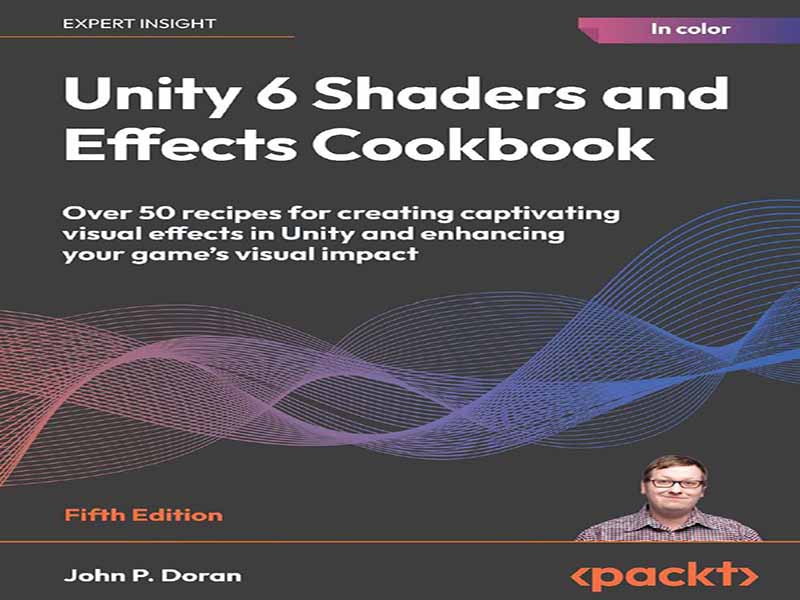
- عنوان کتاب: Unity 6 Shaders and Effects Cookbook -Over 50 recipes for creating captivating visual effects in Unity
- نویسنده: John P. Doran
- حوزه: توسعه بازی , Unity
- سال انتشار: 2022
- تعداد صفحه: 532
- زبان اصلی: انگلیسی
- نوع فایل: pdf
- حجم فایل: 16.4 مگابایت
کتاب آشپزی سایهزنها و جلوههای Unity 6 برای توسعهدهندگان بازی طراحی شده است که میخواهند سایهزنها را از ابتدا ایجاد کنند یا پروژههای خود را با جلوههای بصری سفارشی در Unity 6 بهبود بخشند. این کتاب به ویژه برای برنامهنویسان بازی، هنرمندان فنی و توسعهدهندگان مشتاق که از قبل درک کاملی از Unity دارند و به دنبال تعمیق مهارتهای خود در ایجاد سایهزن با Shader Graph، ShaderLab و HLSL هستند، مفید است. این کتاب آشنایی با رابط کاربری Unity و گردشهای کاری اولیه را فرض میکند و برای کسانی که در سطح متوسط یا بالاتر در سفر توسعه Unity خود هستند، مناسبترین است. آنچه این کتاب پوشش میدهد فصل 1، استفاده از پسپردازش با URP، بررسی میکند که چگونه سایهزنهای صفحه نمایش در URP میتوانند سبک یک بازی را اصلاح کنند و در عین حال مفاهیم کلیدی سایهزن را معرفی میکنند. شما یاد خواهید گرفت که چگونه پسپردازش را فعال و پیکربندی کنید، دانهبندی، سایهروشن و عمق میدان را برای ظاهری سینمایی اعمال کنید، از شکوفه و تاری حرکت برای جلوههای پویا استفاده کنید و لحن صحنه را از طریق درجهبندی رنگ تنظیم کنید. این فصل با استفاده از مه برای ایجاد جوهای فراگیر، ایدهآل برای بازیهای ترسناک، به پایان میرسد. فصل 2، ایجاد اولین شیدر خود با Shader Graph، تکنیکهای رایج انتشار در خطوط لوله سایهزنی مدرن را معرفی میکند و بر چگونگی تعامل نور با سطوح برای افزایش واقعگرایی در گرافیکهای سهبعدی تمرکز دارد. شما با Shader Graph در Unity آشنا خواهید شد، ابزاری بصری که امکان ایجاد شیدر را بدون نوشتن کد فراهم میکند. در پایان فصل، شما قادر خواهید بود شیدرهای اولیه ایجاد کنید، ویژگیهای قابل تنظیم را تعریف کنید و از Shader Graph برای اجرای عملیات بصری اساسی در Unity استفاده کنید. فصل 3، کار با سطوح، نگاهی عمیقتر به مواد سطحی در Shader Graph میاندازد. تسلط بر مواد سطحی برای ایجاد شیدرهای بصری جذاب و بهینه در Unity ضروری است. این فصل با یک ماده مات ساده شروع میشود و به سمت جلوههای پیشرفتهتر، از جمله پیشبینیهای هولوگرافیک، پیش میرود. فصل 4، کار با نگاشت بافت، به شما میآموزد که چگونه بافتها را در شیدرها اعمال و دستکاری کنید تا کیفیت بصری را افزایش داده و جلوههای پویا ایجاد کنید. این فصل شامل دستکاری UV برای پیمایش بافتها، ترکیب چندین بافت برای مواد غنیتر و پیادهسازی شفافیت برای سطوح واقعگرایانه است. در پایان این فصل، شما قادر خواهید بود بافتها را متحرکسازی کرده و ویژگیهای شیدر را در زمان اجرا با استفاده از C# تغییر دهید. فصل 5، بهبود واقعگرایی: Unity Muse و رندرینگ مبتنی بر فیزیک، به بررسی PBR و چگونگی سادهسازی ایجاد مواد و بافتهای واقعگرایانه توسط Unity Muse، یک ابزار هوش مصنوعی مولد، میپردازد. این فصل نحوه تعامل نور با سطوح، نقش PBR در دستیابی به واقعگرایی و نحوه تنظیم دقیق مواد با استفاده از منوی اصلاحات Muse را پوشش میدهد. در پایان، شما قادر خواهید بود اصول PBR را اعمال کنید، سطوح بازتابنده ایجاد کنید، شفافیت اضافه کنید و نورپردازی را برای وفاداری بصری بهینه، تنظیم کنید. فصل 6، استفاده از توابع رأس، توابع رأس و نحوه استفاده از شیدرها را نه تنها برای تعریف ظاهر یک شیء، بلکه برای تغییر هندسه آن در زمان واقعی توضیح میدهد. این فصل دسترسی به دادههای رأس، متحرکسازی رأسها و استفاده از شیدرها برای ایجاد تغییر شکلها بدون تغییر مش زیرین را پوشش میدهد. در پایان، شما تجربه عملی با مدلهای اکسترود شده، پیادهسازی یک سایهزن برفی و شبیهسازی انفجارهای حجمی خواهید داشت. فصل 7، استفاده از Grab Passes، به Grab Passes میپردازد، یک تکنیک قدرتمند برای ثبت و دستکاری صحنه پسزمینه در داخل سایهزنها برای ایجاد جلوههای شفافیت پیشرفته. برخلاف شفافیت ساده که فقط آنچه را که در پشت یک شیء است نشان میدهد، Grab Passes امکان شکست، اعوجاج و تعاملات پویا با پسزمینه را فراهم میکند. این فصل استفاده از Grab Passes برای طراحی پشت اشیاء، پیادهسازی یک سایهزن شیشهای با جلوههای شیشهای رنگی و ایجاد یک سایهزن آب برای بازیهای دوبعدی برای شبیهسازی اعوجاجهای متحرک را پوشش میدهد. فصل 8، بهینهسازی سایهزنها، تکنیکهای بهینهسازی سایهزن را برای اطمینان از رندرینگ با عملکرد مناسب در پلتفرمهای مختلف بررسی میکند. ما عناصر کلیدی که بر عملکرد سایهزن تأثیر میگذارند، از جمله کاهش سربار حافظه، بهینهسازی محاسبات و نحوه استفاده بهینه از متغیرهای داخلی Unity را بررسی خواهیم کرد. شما یاد خواهید گرفت که چگونه سایهزنها را پروفایل کنید، انواع دقت (ثابت، نیمه یا شناور) را برای مدیریت بهتر حافظه تنظیم کنید و محاسبات روشنایی را برای مطابقت با سختافزارهای سطح پایین اصلاح کنید. فصل 9، ایجاد جلوههای صفحه نمایش با سایهزنهای تمام صفحه، به شما آموزش میدهد که چگونه سایهزنهای تمام صفحه ایجاد کنید تا جلوهها را مستقیماً در یونیتی اعمال کنید و کنترل کامل بر رندرینگ در زمان واقعی را به دست آورید. برخلاف پشته پسپردازش داخلی یونیتی، سایهزنهای تمام صفحه به توسعهدهندگان این امکان را میدهند که جلوههای بصری سفارشی مانند جلوههای مبتنی بر عمق و تصحیح رنگ را از ابتدا ایجاد کنند. این فصل به بررسی بافر عمق میپردازد، نحوه ایجاد حالتهای ترکیبی شبیه فتوشاپ را نشان میدهد و به شما آموزش میدهد که چگونه روشنایی، اشباع و کنتراست را به صورت پویا تنظیم کنید. فصل 10، گیمپلی و جلوههای صفحه نمایش، بر اساس مفاهیم فصل 9، ایجاد جلوههای صفحه نمایش با سایهزنهای تمام صفحه، با تمرکز بر ایجاد جلوههای صفحه نمایش خاص که…
Unity 6 Shaders and Effects Cookbook is designed for game developers who want to create shaders from scratch or enhance their projects with custom visual effects in Unity 6. It is especially useful for game programmers, technical artists, and aspiring developers who already have a solid understanding of Unity and are looking to deepen their skills in shader creation with Shader Graph, ShaderLab, and HLSL. This book assumes familiarity with Unity’s interface and basic workflows, and is best suited for those at an intermediate level or higher in their Unity development journey. What this book covers Chapter 1, Using Post-Processing with URP, explores how screen shaders in URP can refine a game’s style while introducing key shader concepts. You will learn how to enable and configure post-processing, apply grain, vignetting, and depth of field for a filmic look, use bloom and motion blur for dynamic effects, and adjust scene tone through color grading. The chapter concludes with using fog to create immersive atmospheres, ideal for horror games. Chapter 2, Creating Your First Shader with Shader Graph, introduces common diffusion techniques in modern shading pipelines, focusing on how light interacts with surfaces to enhance realism in 3D graphics. You will be introduced to Shader Graph in Unity, a visual tool that enables shader creation without writing code. By the end of the chapter, you’ll be able to create basic shaders, define adjustable properties, and use Shader Graph to execute fundamental visual operations in Unity. Chapter 3, Working with Surfaces, takes a deeper dive into surface materials in Shader Graph. Mastering surface materials is essential for creating visually compelling and optimized shaders in Unity. This chapter begins with a simple matte material and progresses to more advanced effects, including holographic projections. Chapter 4, Working with Texture Mapping, teaches you how to apply and manipulate textures in shaders to enhance visual quality and create dynamic effects. The chapter covers UV manipulation for scrolling textures, blending multiple textures for richer materials, and implementing transparency for realistic surfaces. By the end of the chapter, you will be able to animate textures and modify shader properties at runtime using C#. Chapter 5, Enhancing Realism: Unity Muse and Physically Based Rendering, explores PBR and how Unity Muse, a generative AI tool, simplifies the creation of realistic materials and textures. The chapter covers how light interacts with surfaces, the role of PBR in achieving realism, and how to fine-tune materials using Muse’s refinements menu. By the end, you will be able to apply PBR principles, create reflective surfaces, add transparency, and bake lighting for optimized visual fidelity. Chapter 6, Using Vertex Functions, explains vertex functions and how shaders can be used not only to define an object’s appearance but also to modify its geometry in real time. The chapter covers accessing vertex data, animating vertices, and using shaders to create deformations without altering the underlying mesh. By the end, you will have hands-on experience with extruding models, implementing a snow shader, and simulating volumetric explosions. Chapter 7, Using Grab Passes, delves into grab passes, a powerful technique for capturing and manipulating the background scene within shaders to create advanced transparency effects. Unlike simple transparency, which only reveals what’s behind an object, grab passes allow for refraction, distortion, and dynamic interactions with the background. The chapter covers using grab passes to draw behind objects, implementing a glass shader with stained-glass effects, and creating a water shader for 2D games to simulate animated distortions. Chapter 8, Optimizing Shaders, explores shader optimization techniques to ensure performance- friendly rendering across different platforms. We will break down key elements that impact shader performance, including reducing memory overhead, optimizing calculations, and how to best leverage Unity’s built-in variables. You will learn how to profile shaders, adjust precision types (fixed, half, or float) for better memory management, and refine lighting calculations to suit lower-end hardware. Chapter 9, Creating Screen Effects with Fullscreen Shaders, teaches you how to create fullscreen shaders to apply effects directly within Unity, gaining full control over real-time rendering. Unlike Unity’s built-in post-processing stack, fullscreen shaders allow developers to craft custom visual effects such as depth-based effects and color correction from scratch. This chapter explores the depth buffer, demonstrates how to create Photoshop-like blend modes, and teaches you how to adjust brightness, saturation, and contrast dynamically. Chapter 10, Gameplay and Screen Effects, builds on concepts from Chapter 9, Creating Screen Effects with Fullscreen Shaders, focusing on creating specific screen effects that completely change how a game feels. You will learn how to create an old movie screen effect, complete with film grain, scratches, and sepia tones, and implement a night vision effect, commonly used in FPS games, while also learning about using sub-graphs to break up complex effects and the Custom Function node, which will allow us to write High-Level Shader Language (HLSL) code directly within Shader Graph. Chapter 11, Understanding Lighting Models, explores how lighting models determine the way light interacts with surfaces in shaders. You will learn how to create custom lighting models, including diffuse shading, toon shading, and Blinn-Phong specular reflections, while also adding shadows and multiple light support. By the end, you will understand how to control light reflection and shading effects, enabling you to create both realistic and stylized materials. Chapter 12, Developing Advanced Shading Techniques, delves into advanced shader development by writing .shader files, combining ShaderLab and HLSL for greater control over rendering effects. You will learn how ShaderLab structures shaders, handling rendering properties, passes, and tags, while HLSL is used to define the vertex and fragment shader logic. By leveraging both, developers can push the boundaries of graphical effects, crafting unique materials that go beyond Shader Graph’s capabilities. Chapter 13, Utilizing the HDRP, introduces the High-Definition Render Pipeline (HDRP). Unlike URP, which prioritizes efficiency, HDRP is designed for powerful hardware such as modern consoles and high-performance PCs. This chapter will guide you through Shader Graph techniques in HDRP, focusing on implementing a glowing highlight system and portal shaders to create dynamic visual effects.
این کتاب را میتوانید از لینک زیر بصورت رایگان دانلود کنید:
Download: Unity 6 Shaders and Effects Cookbook

























نظرات کاربران